The local LLM proxy with real failover.
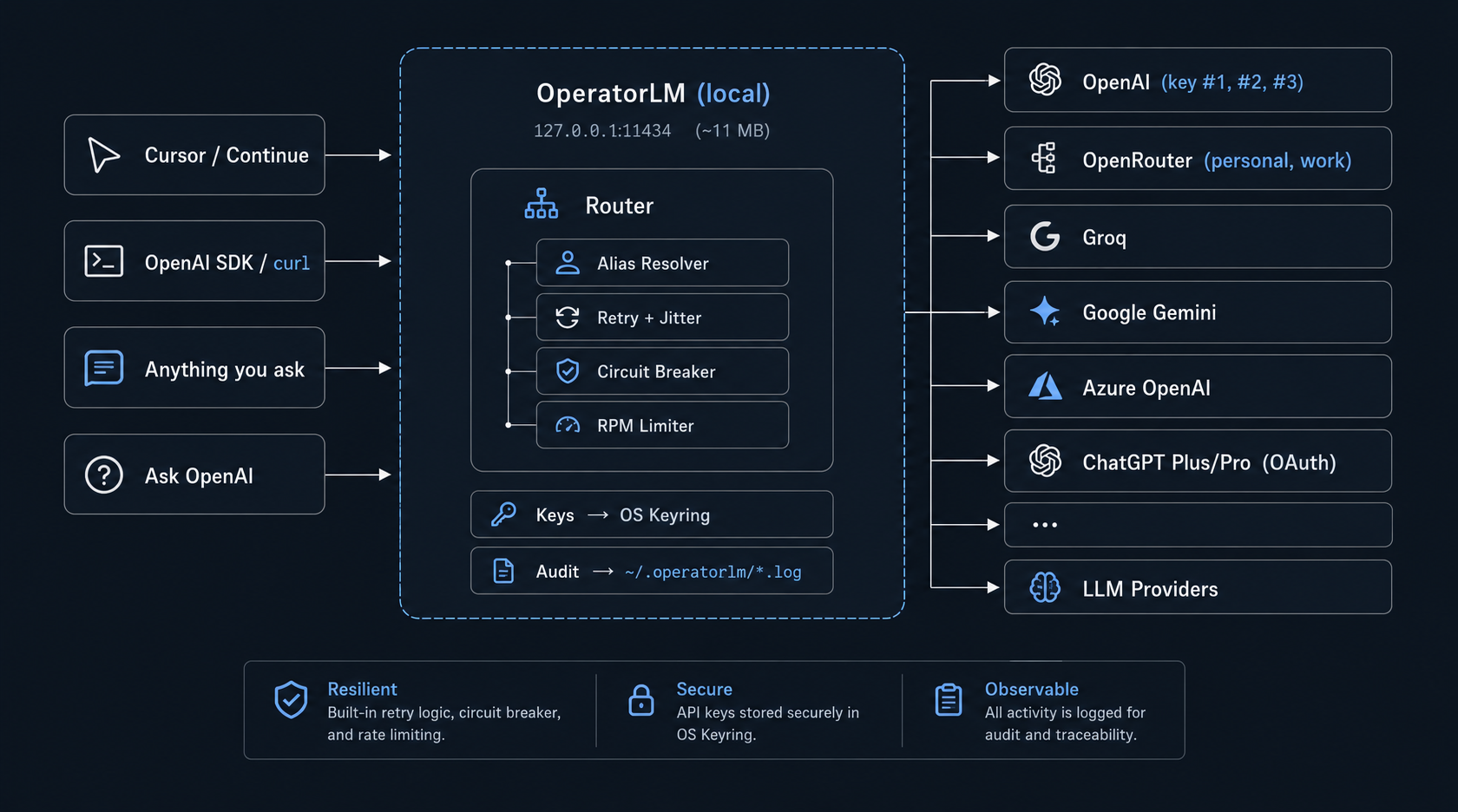
One 11 MB binary sits between your IDE and every LLM provider you use — OpenAI, OpenRouter, Groq, Gemini, Azure, and even your ChatGPT Plus/Pro subscription. Stack multiple keys behind one model name. Secrets stay in your OS keyring.
Single 11 MB binary • No Docker • No Python • MIT licensed

Works out of the box with anything that speaks OpenAI — or already points at Ollama (same port 11434).
Your LLM workflow is too fragile.
You hit a 429 on OpenAI and your IDE just… stops. You paste API keys into a config file. You pay for credits even though you're already paying for ChatGPT Plus. You spin up a Python service in Docker just to route between two providers.
It shouldn't be this hard.
Multi-account aliasing
Stack three OpenAI keys, two OpenRouter accounts, and a free Groq backup behind a single model name. OperatorLM walks the list until one succeeds.
Production-grade failover
Per-target 3-state circuit breaker. Retries with exponential backoff and jitter. Sliding-window RPM limiter. Different cooldowns for 429s, 5xx, and network errors.
Zero secrets on disk
Keys live in Windows Credential Manager, macOS Keychain, or the Linux Secret Service. The TOML config file holds only references — never the keys themselves.
One model name.
Many backends.
Most local proxies route one model to one upstream. OperatorLM lets one model name fan out across N keys and providers — in priority order, with per-target rate limits.
Your IDE just says model: "gpt-5.2". OperatorLM walks the keys until one succeeds. Hit a 429 on key #1? Circuit-broken for 15s — key #2 takes over instantly.
[[aliases]]
name = "gpt-5.2"
targets = [
  { provider = "openai", target_model = "gpt-5.2", priority = 1 },
  { provider = "openrouter", target_model = "openai/gpt-5.2", priority = 2 },
  { provider = "azure", target_model = "gpt-5.2", priority = 3 }
]
Failover that actually fails over.
All of these are tunable live from the admin UI — no restart needed.
Already paying for ChatGPT Plus? Use it as a backend.
Sign in once via OAuth. Get your Plus/Pro quota wired into the same OpenAI-compatible API your tools already speak.
Experimental Feature
The chatgpt-codex provider is unofficial and not endorsed by OpenAI. It reuses the public OAuth client ID from OpenAI's Codex CLI. OpenAI can rotate or revoke it at any time. Usage may violate OpenAI's Terms of Service. Only /v1/responses is supported. Use at your own risk.
Five steps. No magic.
Receive
Your IDE sends a standard OpenAI POST /v1/chat/completions request to 127.0.0.1:11434.
Resolve
OperatorLM looks up the requested model in your aliases and expands it into a prioritized list of target keys/providers.
Inject
For the current target, it retrieves the API key securely from your OS keyring and injects it.
Try-retry-break
It attempts the request. If it hits a 429, it instantly falls back to the next priority target. If it hits a 500, it retries.
Audit
The final response is streamed back to your IDE, and a redacted event is written to the local audit log.
How OperatorLM compares.
| Feature | OperatorLM | LiteLLM | OmniRoute |
|---|---|---|---|
| Language | Go (native) | Python | TypeScript |
| Distribution | Single binary (11MB) | Docker / pip | npm / Docker |
| Tray App / GUI | ✅ Built-in | ❌ Server only | ❌ Server only |
| Key Storage | OS Keyring | .env / DB | Environment |
| Multi-key aliasing | ✅ First-class | ✅ Supported | ✅ Supported |
| Circuit Breaker | ✅ Yes | ⚠️ Basic | ❌ No |
Verdict: Pick OperatorLM if you want a desktop-first, single-binary proxy that handles failover and multi-account routing like a production service — without a Python service or sending your keys through someone else's cloud.
Install in 30 seconds.
Select your operating system to download v0.1.0.
OperatorLM-windows-amd64.exe. Double-click. Tray icon appears (no console flash). On first launch, SmartScreen may flag it — More info → Run anyway.OperatorLM-darwin-arm64, chmod +x, run. On first launch, right-click → Open in Finder.OperatorLM-darwin-amd64, chmod +x, run. On first launch, right-click → Open in Finder.OperatorLM-linux-amd64, chmod +x, run. Tray icon appears.OPERATORLM_NO_TRAY=1 ./OperatorLM-linux-amd64. Controlled via SIGINT/SIGTERM. ✓ Browse to http://127.0.0.1:11434/admin/ → add a provider → paste an API key → send a test request from the Try It tab.
Use it from anything.
Drop-in replacement for OpenAI SDKs. Just change the base URL.
curl http://127.0.0.1:11434/v1/chat/completions \
  -H "Content-Type: application/json" \
  -d '{
    "model": "gpt-5.2",
    "messages": [{"role": "user", "content": "Hello!"}]
  }'
from openai import OpenAI
client = OpenAI(
base_url="http://127.0.0.1:11434/v1",
api_key="not-needed"
)
response = client.chat.completions.create(
model="gpt-5.2",
messages=[{"role": "user", "content": "Hello!"}]
)import OpenAI from 'openai';
const openai = new OpenAI({
baseURL: 'http://127.0.0.1:11434/v1',
apiKey: 'not-needed'
});
const response = await openai.chat.completions.create({
model: 'gpt-5.2',
messages: [{ role: 'user', content: 'Hello!' }],
});Security model.
Zero telemetry. Zero phone-home. Your keys stay on your machine.
-
Loopback-only
Binds exclusively to
127.0.0.1. The admin UI is unreachable from the network unless you proxy it yourself. -
Host-header validation
Rejects DNS-rebinding attempts out of the box.
-
Optional local API key
Gates
/admin/*and/v1/*if you need local authorization. -
OS Keyring integration
API keys live in Windows Credential Manager, macOS Keychain, or Linux Secret Service via libsecret. The TOML config holds references, never the keys.
-
Redacted audit logs
Every request lands in a JSONL audit log.
Authorizationheaders are stripped by default.
Frequently asked.
Is this a fork of Ollama?
No. Ollama runs models locally. OperatorLM routes requests to remote providers. We happen to bind on the same port (11434) so anything pointed at Ollama works unchanged.
Do you see my API keys?
No. There is no server, no telemetry. Keys live in your OS keyring on your machine.
Does the ChatGPT Plus backend work for chat/completions?
No — only /v1/responses, and only Codex/GPT-5.x models. See the experimental disclaimer.
Can I run it on a server?
Yes — OPERATORLM_NO_TRAY=1 skips the tray and runs as a plain HTTP server. Reach it over WireGuard/Tailscale.
Why not just use LiteLLM?
LiteLLM is great if you want a Python service. OperatorLM is a single native binary, has a real tray app, stores keys in the OS keyring, and ships an embedded admin UI.
What providers are supported?
OpenAI, OpenRouter, Groq, Google Gemini, Azure OpenAI, ChatGPT Plus/Pro (experimental), plus a generic 'custom' type for any OpenAI-compatible endpoint.
How big is the binary?
About 11 MB. ~50 MB RAM at idle.
What's the license?
MIT.